Mod Manager Download, into Mortar
Click Nexus's own Mod Manager Download button and the file goes to the right Mortar profile. The extension never starts a download by itself.
Browser extension
See which mods your Mortar profile already has while you browse Nexus Mods, and send Mod Manager Download clicks straight to Mortar. For Firefox, Chrome, Edge and other Chromium browsers.
Free and open source. Needs Mortar on the same computer.
Click Nexus's own Mod Manager Download button and the file goes to the right Mortar profile. The extension never starts a download by itself.
Mod pages, file lists and search results show which mods and files the open profile already has, so you don't download twice.
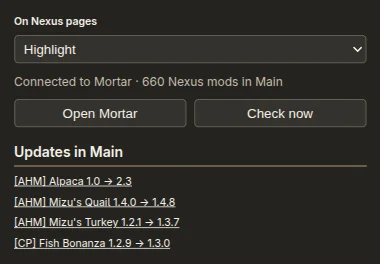
The toolbar popup lists updates for the mods in your profile and flags broken or obsolete mods on their pages.
.xpi in
Firefox, or drop it on about:addons, and confirm.
chrome://extensions (or
edge://extensions), turn on Developer mode, choose
Load unpacked and pick the unzipped folder. A
Chrome Web Store listing is on the way.
The extension talks only to the Mortar app on your own computer, through the browser's native messaging. It has no server, no analytics and no telemetry.
Mortar's browser extension reads Nexus Mods pages in your browser to mark mods and to pass Mod Manager Download links to the Mortar desktop app installed on your own computer, using the browser's native messaging. The only data exchanged is Nexus mod ids, file ids and nxm:// links going to Mortar, and installed-mod and update information coming back. It runs only on https://www.nexusmods.com. The extension makes no network requests of its own, has no server, analytics or telemetry, and sends nothing to the developers or any third party. Your display choice and filter settings are stored in your browser's extension storage and never leave it. Uninstalling the extension removes them.
nativeMessaging to reach Mortar on your computer;
access to www.nexusmods.com only, to read and mark
its pages; scripting to add its marks to Nexus tabs
that were already open when it was installed;
storage for your display settings;
alarms to refresh the update check.
Every line is public at github.com/Rethunk-Tech/mortar-browser-extension, with no build step: the files in the release are the files in the repository.